When grid power returns after an outage, a well-designed barrier gate operator should recover to a known state, self-test, and resume normal operation. Most modern controllers do this successfully. A meaningful fraction — particularly older electromechanical units, hydraulic systems with absolute encoder loss, and units that lost power mid-cycle — do not. They come back in a confused state: limit switches not referenced, safety loops showing fault, or the gate sitting half-raised with the motor disabled.
Crews arriving after an outage need a defensible reset procedure. Improvised troubleshooting in a driveway full of queued vehicles leads to skipped safety checks.
What power failure actually does to the controller
Three distinct failure-recovery scenarios:
- Clean shutdown. Power drops while gate was at rest (full up or full down). On recovery, controller self-tests, references limit switches, resumes normal.
- Mid-cycle loss. Power drops while gate was moving. On recovery, controller does not know current arm position. Depending on design, unit either waits for manual reference command or slowly moves to nearest limit.
- Extended outage with battery drain. Battery-backed memory (for absolute encoder position, cycle counters, configuration) drains. On recovery, unit may come up with factory defaults requiring full re-commissioning.
Units with absolute encoders and non-volatile flash memory handle all three scenarios gracefully. Units with incremental encoders and battery-backed SRAM handle scenario 1 well, scenario 2 with user intervention, and scenario 3 poorly.
Standard post-outage procedure
Before re-energizing, confirm the obvious: physical damage, water intrusion, lightning strike evidence, fault lights. If any are present, do not power the unit until inspection is complete.
Standard steps once visual inspection is clear:
- Confirm breaker and disconnect status. Verify upstream panel is restored and at normal voltage.
- Energize control power first if separately switched. Many commercial operators have a service disconnect that allows control-only power for diagnostics.
- Observe controller boot. LEDs should progress through a defined sequence. Fault codes during boot should be logged before clearing.
- Check position feedback. On controllers with encoder readout, confirm the unit reports a plausible arm position before commanding motion.
- Command manual reference cycle. Most controllers have a “find limits” or “reference” command that slowly drives the arm to both limit switches, confirming positions and clearing position-unknown faults.
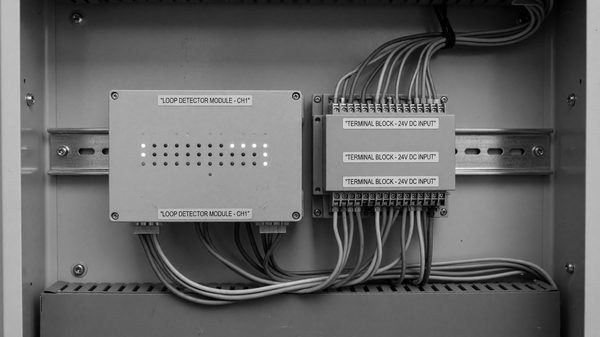
- Verify safety loops. Each loop detector should self-test and report no-fault status. Loops that have been unpowered for more than a few hours may take a few minutes to re-tune.
- Test safety circuits. Place a test obstruction under the arm; command close; verify the gate stops and reverses. Repeat with photo beams if equipped.
- Command three full cycles unloaded. Confirm smooth motion, no abnormal sounds, no fault codes.
- Return to service and observe first live cycles.
A printable version of this checklist should live in the gate cabinet. NFPA 70E electrical safety practices apply during the inspection portion.
Limit switch recalibration
Mechanical limit switches can shift during an outage if the arm was forced (wind, vehicle strike, snowplow) while the motor was unpowered. Symptoms:
- Gate over-travels on open or close
- Gate stops short of fully open or closed
- Controller reports “limit fault” or “position out of range”
Recalibration for a typical electromechanical unit:
- Place controller in setup mode (typically a keyswitch or DIP switch).
- Manually hand-crank arm to desired fully-closed position.
- Adjust closing limit switch to activate at that position.
- Manually crank to desired fully-open position (usually 85-88 degrees, not full vertical, to avoid over-travel on momentum).
- Adjust opening limit switch to activate at that position.
- Exit setup mode; command a cycle; confirm both limits activate cleanly.
Hydraulic units typically use pressure switches or internal sensors rather than mechanical limit switches; recalibration is similar in principle but specific to manufacturer.
Controller reinitialization
If the unit has lost configuration (scenario 3 above), full reinitialization is required. This typically means:
- Re-entering time and date
- Re-setting hold-open, pre-warn, and ancillary timers
- Reconfiguring I/O assignments (loop-to-function mapping, access control inputs, output relay assignments)
- Re-enabling any custom features (intercom integration, vehicle counting output, etc.)
Keeping a site-specific configuration record — a printed sheet or exported config file — in the cabinet cuts reinitialization from hours to minutes. Most modern controllers support configuration export to a USB drive; using that feature monthly is cheap insurance.
UPS and battery backup
Small UPS units (roughly 1 kVA) can keep the control board and detectors alive through short outages while allowing the main motor to ride out the outage without movement. This avoids mid-cycle loss and position-unknown faults on most platforms. Battery health should be tested annually — a UPS with a dead battery is worse than none because it creates a false sense of resilience.
Frequently Asked Questions
Should I leave the gate in manual-open mode during extended outages?
For most commercial sites, yes. Access control is typically more important than enforcement during an outage, and leaving the arm up prevents vehicle strikes during recovery.
How long does a full reset procedure take?
An experienced tech with a familiar platform: 15-20 minutes. A new tech with an unfamiliar platform and missing config record: 2+ hours.
Do surge protection devices on the gate circuit prevent these issues?
SPDs prevent the one high-consequence failure (lightning-induced board damage) but do nothing for routine grid outages. Both SPD and UPS are worthwhile.
Can I automate the reset procedure?
Most modern controllers self-recover from scenarios 1 and 2 without intervention. Scenario 3 still requires a person. Configuration-backup automation (scheduled exports) is the highest-value automation in this area.